By using this site, you agree to the Privacy Policy and Terms of Use.
Accept
CoinRoopCoinRoopCoinRoop
  • Home
  • Crypto Business
  • Exchange
  • Learn
    • Forex
    • Crypto Wallet
    • Crypto News
    • Forex Broker
    • How To Buy
    • Bitcoin
    • Net Worth
    • Crypto Knowledge
    • Crypto People
    • DEFI
    • Sponsored
  • Press Release
  • Altcoin
    • Live Price
    • Prediction
  • Contact Us
Search Article On Coinroop
- Advertisement -
  • Advertise
  • Contact Us
  • About CoinRoop
  • Disclaimer
  • Editorial Guidelines
  • Privacy Policy
  • Sitemap
© 2025 Coinroop News Network. All Rights Reserved. Email - hello@coinroop.com
Reading: How To Buy Java Edition Only – Step-by-Step Guide
Share
Sign In
Notification Show More
Font ResizerAa
CoinRoopCoinRoop
Font ResizerAa
  • Advertise
  • Contact Us
  • About CoinRoop
  • Disclaimer
  • Editorial Guidelines
  • Privacy Policy
  • Sitemap
Search Article On Coinroop
  • Home
  • Crypto Business
  • Exchange
  • Learn
    • Forex
    • Crypto Wallet
    • Crypto News
    • Forex Broker
    • How To Buy
    • Bitcoin
    • Net Worth
    • Crypto Knowledge
    • Crypto People
    • DEFI
    • Sponsored
  • Press Release
  • Altcoin
    • Live Price
    • Prediction
  • Contact Us
Have an existing account? Sign In
Follow US
  • Advertise
  • Contact Us
  • About CoinRoop
  • Disclaimer
  • Editorial Guidelines
  • Privacy Policy
  • Sitemap
© 2025 Coinroop News Network.. All Rights Reserved. Help/Ads Email us - hello@coinroop.com
- Advertisement -
- Advertisement -
Learn

How To Buy Java Edition Only – Step-by-Step Guide

Muffin Lomboda
Last updated: 08/07/2025 12:28 AM
Muffin Lomboda
Share
Disclosure: This website may contain affiliate links, which means I may earn a commission if you click on the link and make a purchase. I only recommend products or services that I personally use and believe will add value to my readers. Your support is appreciated!
How To Buy Java Edition Only – Step-by-Step Guide
SHARE

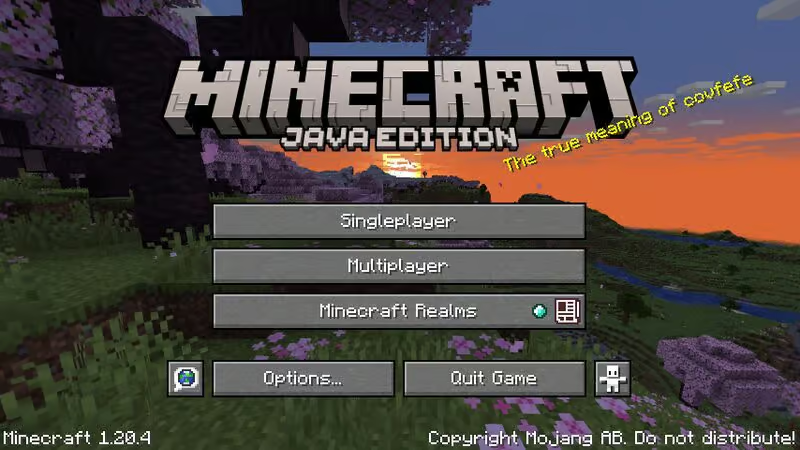
In this article, I will elaborate on how to only purchase Java Edition which is specifically meant for PC users.

If you are starting out or moving from Bedrock, this guide will enable you to buy and install Minecraft Java Edition from the official website smoothly so that you can fully enjoy its unique benefits such as mods, custom servers and a lot more.

What is Minecraft Java Edition?

The sandbox game Mojang developed Minecraft has an original version called Minecraft Java Edition. This version is available on Windows, MacOS, and Linux. It is the only version that has user-made mods, gold packs, and Java commands, which enhances the player’s experience.

As compared to other versions, Minecraft Java Edition has more community features such as custom multiplayer servers, advanced redstone, and experimental features which are updated often.

- Advertisement -

Java Edition is not as versatile as Bedrock Edition since it does not allow mobile or console users to play alongside other users. Overall, it is suited to PC gamers who like community made content, creativity and customization. For older fans or expert players looking for more control and flexibility, Minecraft Java Edition is ideal.

How To Buy Java Edition Only

Step-by-Step Walkthrough:
How To Buy Java Edition Only

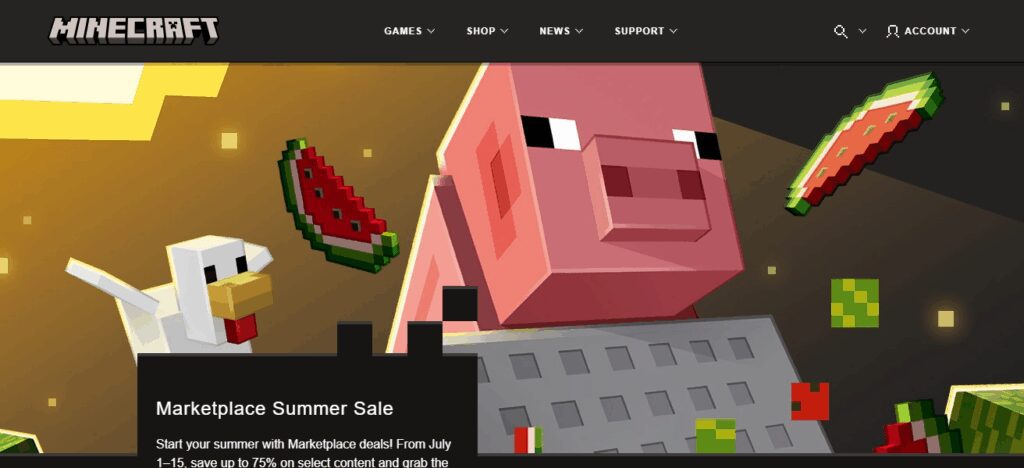
Access the Official Minecraft SiteOpen your browser and go to https://www.minecraft.net.

Press the Get Minecraft ButtonBoth on the home page and footer, a button labeled “Get Minecraft” is present. Click on it.

Identify Your Device’s Operating SystemClick on “Computer” followed by “Windows.”

Choose to Purchase Java EditionYou’ll be prompted with the purchase option for “Minecraft: Java & Bedrock Edition for PC” bundle. Though both versions will be available, you can opt to install Java Edition exclusively after the purchase.

- Advertisement -

Log Into Your Microsoft AccountFor verification, a Microsoft account is required.

Finalize Your TransactionYou can pay using credit/debit cards, PayPal and several other payment options. The game costs around \$29.99 USD but can vary based on region.

Install the Game LauncherYou can download and install the launcher after your payment from your account dashboard.

- Advertisement -

Launch and Play the GameUsing the launcher, sign in and install “Minecraft Java Edition” to enjoy playing.

Why Buy Java Edition Only?

Minecraft Java Edition is perfect for those who want utmost flexibility in Minecraft. Unlike Bedrock Edition, it offers thousands of player-mods, custom skins, complex commands, and community hosted servers with popular minigames and modded worlds.

Because of the constant updates and extensive mods available, It’s the version of choice for most YouTubers, streamers, and experienced PC players. For players that are on PC, the most creative and technical version of Minecraft is through the Java Edition.

Troubleshooting Purchase Issues
Troubleshooting Purchase Issues

Payment Errors

Check card details, browser, and consider other payment options available.

Launcher Download Issues

Disable antivirus, clear cache, or connect to a stable network.

Account Login Problems

Reset password, verify associated Microsoft account, check email used correctly.

Tips for New Java Edition Players

Where To Find Popular Mods And Servers Be cautious and look for quality mods and resource packages on Planet Minecraft and CurseForge for Java Edition servers.

Java’s Unique Gamepad Controls And Settings Java Edition offers total freedom; set custom keybinds, adjust render distance, and turn on V-Sync for smoothest gameplay.

Suggested Launchers Or Mods Like Optifine And Forge For increased graphics and FPS, Optifine is recommended. Use Forge with a separate launcher for managing numerous mods easily.

Conclusion

To sum up The process for buying Minecraft Java Edition is straightforward if you follow the necessary steps. Simply go to the official Minecraft website, set up a Microsoft account, and buy the Java and Bedrock bundle, selecting Java Edition in the launcher afterward.

Offers plethora of exclusive mods, servers, and customization options, makes Java Edition the PC gamers’ preferred version for a more immersive and versatile Minecraft experience.

FAQ

Do I need a Microsoft account?

Yes, it’s required for purchase and login.

Can I buy Java Edition alone?

No, it’s now sold as a bundle with Bedrock. But you can install Java only.

What’s the price?

Around $29.99 USD (varies by region).

- Advertisement -
10 Zero Balance Savings Accounts You Can Open Online
10 Best Mailchimp Alternatives for Email Marketing 2026
10 Top Bitcoin Rich List 2026: Biggest BTC Holders Ranked
How to Buy TikTok Stock in 2026: Step-by-Step Guide
10 Best AI-Based Credit Scoring Platforms for Smart Lending

Disclaimer

The content posted on Coinroop.com is for informational purposes only and should not be taken as financial or investment advice. We cannot always ensure that everything is complete, accurate, or reliable.
By signing up, you agree to our Terms of Use and acknowledge the data practices in our Privacy Policy. You may unsubscribe at any time.
Share This Article
Facebook Whatsapp Whatsapp LinkedIn Reddit Telegram Threads Bluesky Copy Link Print
ByMuffin Lomboda
Follow:
Articles about cryptocurrency usage, account deletion and how-to guides are written by Muffin Lomboda. For nearly three years, Muffin has been actively involved in the crypto industry and this has given him enough skills to offer useful tips aimed at guiding people on their digital journeys.
Previous Article How To Buy Japanese Yen: A Simple Guide for Beginners How To Buy Japanese Yen: A Simple Guide for Beginners
Next Article How to Buy Japanese Pokémon Cards: A Complete Guide How to Buy Japanese Pokémon Cards: A Complete Guide
CONTACT COINROOP
Ads & Partners
Reach Coinroop for sponsored posts, exchange listings, partnerships and promotions.
hello@coinroop.com
TOP CRYPTO PLATFORMS
Best Crypto Exchanges
Trade Bitcoin, altcoins, futures and Web3 assets using trusted global exchanges.

OKX

Web3 & Futures
Trade

KuCoin

Altcoin Exchange
Trade

Bitget

Copy Trading
Trade

MEXC

Fast Listings
Trade

Gate.io

Crypto Marketplace
Trade
- Advertisement -
TOP CRYPTO WALLETS
Best Wallet Apps
Store, swap and manage Bitcoin, Ethereum and Web3 assets securely.

Trust Wallet

Multi-Chain Wallet
Open

MetaMask

Web3 Wallet
Open

Ledger

Hardware Security
Open

Exodus

Desktop & Mobile
Open

Phantom

Solana Wallet
Open
TOP CRYPTO TOOLS
Trader Essentials
Track prices, charts, liquidations and on-chain trends using pro crypto tools.

CoinMarketCap

Crypto Price Tracker
Open

CoinGlass

Liquidation Heatmaps
Open

TradingView

Advanced Charts
Open

DexScreener

DEX Analytics
Open

Arkham

Wallet Intelligence
Open
- Advertisement -
TOP CRYPTO CASINOS
Best Casino Sites
Play slots, live games and sports betting using trusted crypto casinos worldwide.

Shuffle

Crypto Casino & Sports
Play

Rain.gg

Provably Fair Games
Play

Cloudbet

Bitcoin Sportsbook
Play

Wild.io

Instant Crypto Betting
Play

Sportsbet.io

Sports & Live Casino
Play
- Advertisement -
bydfi 300x250
- Advertisement -

Stay Connected

FacebookLike
XFollow
PinterestPin
TelegramFollow

Latest News

Top 10 Cyber Recovery Best Practices Built Into Cohesity Data Protection
Technology
Top 10 Advantages of Bitdefender GravityZone vs Antivirus
Technology
Top 10 Continuous Threat Exposure Management Tools Provided by Picus Security 
Blog
XRP News: Chris Larsen’s Ripple Wallets Turn Active Again
Crypto News

You Might also Like

Brian Armstrong Net Worth 2026: Coinbase Crypto Billionaire
Net Worth

Brian Armstrong Net Worth 2026: Coinbase Crypto Billionaire

10 Min Read
Michael Saylor Net Worth 2026: Bitcoin Billionaire Fortune
Net Worth

Michael Saylor Net Worth 2026: Bitcoin Billionaire Fortune

11 Min Read
Changpeng Zhao (CZ) Net Worth in 2026
Net Worth

Changpeng Zhao (CZ) Net Worth in 2026

9 Min Read
Sam Bankman-Fried Net Worth in 2026
Net Worth

Sam Bankman-Fried Net Worth in 2026

13 Min Read

Our Address

In Heart Of World
Dubai & Europe
hello@coinroop.com
For Advertisement Email us or telegram at our telegram id - @coinroopads

LATEST PRESS RELEASE

ISO 1776242621mzaExOODiY
Bitunix Exchange Secures ISO 27001:2022 Certification, Reinforcing Strong Protection of User Data
Press Release

Categories

CoinRoopCoinRoop
Follow US
© 2025 Coinroop News Network. All Rights Reserved.
  • Advertise
  • Contact Us
  • About CoinRoop
  • Disclaimer
  • Editorial Guidelines
  • Privacy Policy
  • Sitemap