
By using this site, you agree to the Privacy Policy and Terms of Use.
Accept
CoinRoopCoinRoopCoinRoop
  • Home
  • Crypto Business
  • Exchange
  • Learn
    • Forex
    • Crypto Wallet
    • Crypto News
    • Forex Broker
    • How To Buy
    • Bitcoin
    • Net Worth
    • Crypto Knowledge
    • Crypto People
    • DEFI
    • Sponsored
  • Press Release
  • Altcoin
    • Live Price
    • Prediction
  • Contact Us
Search Article On Coinroop
- Advertisement -
  • Advertise
  • Contact Us
  • About CoinRoop
  • Disclaimer
  • Editorial Guidelines
  • Privacy Policy
  • Sitemap
© 2025 Coinroop News Network. All Rights Reserved. Email - hello@coinroop.com
Reading: How to Buy Google Play Credit Easily in 2025
Share
Sign In
Notification Show More
Font ResizerAa
CoinRoopCoinRoop
Font ResizerAa
  • Advertise
  • Contact Us
  • About CoinRoop
  • Disclaimer
  • Editorial Guidelines
  • Privacy Policy
  • Sitemap
Search Article On Coinroop
  • Home
  • Crypto Business
  • Exchange
  • Learn
    • Forex
    • Crypto Wallet
    • Crypto News
    • Forex Broker
    • How To Buy
    • Bitcoin
    • Net Worth
    • Crypto Knowledge
    • Crypto People
    • DEFI
    • Sponsored
  • Press Release
  • Altcoin
    • Live Price
    • Prediction
  • Contact Us
Have an existing account? Sign In
Follow US
  • Advertise
  • Contact Us
  • About CoinRoop
  • Disclaimer
  • Editorial Guidelines
  • Privacy Policy
  • Sitemap
© 2025 Coinroop News Network.. All Rights Reserved. Help/Ads Email us - hello@coinroop.com
- Advertisement -
- Advertisement -
How To

How to Buy Google Play Credit Easily in 2025

Nick Jonesh
Last updated: 09/07/2025 12:55 AM
Nick Jonesh
Share
Disclosure: This website may contain affiliate links, which means I may earn a commission if you click on the link and make a purchase. I only recommend products or services that I personally use and believe will add value to my readers. Your support is appreciated!
How to Buy Google Play Credit Easily in 2025
SHARE

In this article, I will discuss the How to Buy Google Play Credit, which can be done simply and securely.

Regardless of if you’re a fresh Android user or seeking convenient methods of payment, purchasing Google Play Credit is straightforward. You will discover the best ways to add credit to your Google account, ranging from online platforms to retail gift cards, in 2025.

What is Google Play Credit?

Google Play Credit allows users to make purchases for apps, games, movies, books, and even subscriptions on the Google Play Store. Users can buy them through gift cards, promo codes, or direct payment methods which then serves as a balance on their account.

What is Google Play Credit?

Once credited, the balance is available for use instantly and does not require a debit or credit card for access. Google Play Credit is highly beneficial for users who prefer paying in controlled amounts or do not have access to regular payment options.

- Advertisement -

How to Buy Google Play Credit

How to Buy Google Play Credit

Example: Purchasing Google Play Credit Worth ₹500 Through Amazon India

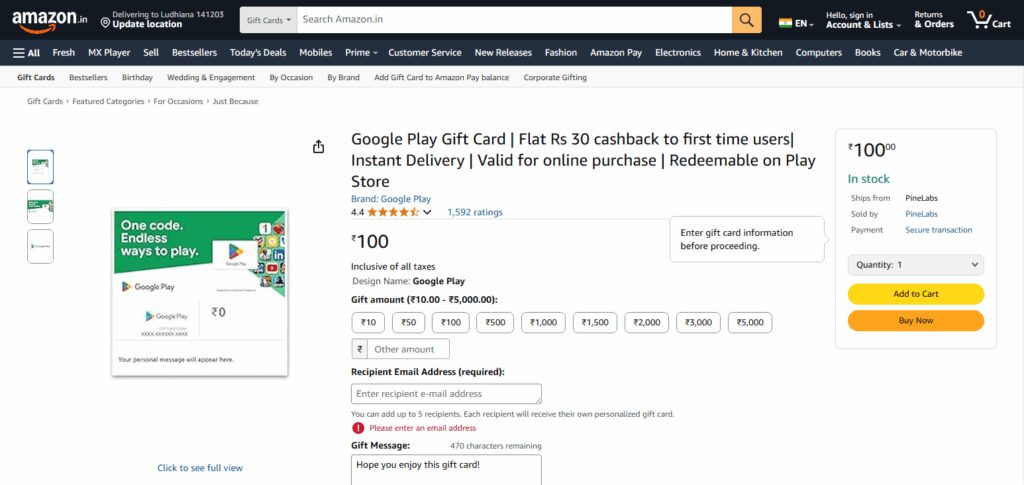
Step 1: Access Amazon

  • Navigate to this link to watch them offer Google Play gift cards through Amazon India.
Step 1: Access Amazon
  • Select the desired amount from the list ₹100, ₹500 or even ₹1500.

Step 2: Checkout Process

  • Confirm the gift card design and the chosen value.
  • Proceed by clicking on checkout after adding it to your cart.
  • Provide an email for delivery where the code will be sent.

Step 3: Claiming The Gift Code

  • Google Play codes are sent via email after payment is complete.
  • Email delivery is near-instant.

Step 4: Code Redemption Steps

  • Launch the Google Play Store application.
  • Click on your profile picture → Payments & subscriptions → Redeem gift code option.
  • Input the code and hit confirm. The balance updated will be close to instant.

Tips for First-Time Buyers

Buy from Trusted Sources: Stick to the Google Play Store, Amazon, or other retail outlets that are approved.

Region Matters: Make sure the code or gift card corresponds to the region of your Google account.

Keep the Code Safe: Sharing your card information or codes with others can lead to scams.

No to Unsanctioned Vendors: Many unofficial sellers may offer fake or used codes.

Redeem Without Delay: Redeem the credit as soon as you buy it to minimize theft or expiry.

- Advertisement -

Spend Wisely: Scope out your Google Play balance frequently to control spending.

Is Google Play Credit refundable?

Refunding Google Play Credit is impossible once it has been added to your account. It’s not possible to transfer it to another account and it won’t be possible to turn it back into money either.

Still, in case you purchased something via Google Play and the app or content is broken or not as per the description, you may claim a refund for that purchase as long as you do it within the specified timeframe of Google Play’s refund policy—usually within two days. Granting refunds takes time and, when/if approved, repayment is always through Google Play Credit.

- Advertisement -

Risk & Considerations

Scam Risk

Avoid buying from unsupported sellers who offer lower prices; these codes might have already been utilized or could be counterfeit.

Geographical Limitations

Gift cards or credits come with a possibility of region-locking and might not be compatible with accounts from other countries.

Cannot be Refunded

Google Play credit that has been redeemed is non-refundable and cannot be shifted to a different account.

Promotional Credit Expires

Certain promotional credits have expiry dates so always check before using them.

Cannot be used outside Google Play Services

The credit can solely be spent in the Google Play ecosystem an for external services.

Trouble with Account:

Using the wrong account could lead to the permanent loss of funds.

Troubleshooting Common Issues

Troubleshooting Common Issues

Code Not Accepted: Ensure you have entered the code correctly. If it has not expired or been used, make sure that it is not time-sensitive.

Geographic Region Issue: Certain Google Play gift cards are applicable within select countries, check if your account region aligns with that of the card.

Balance not updated: Reopen your app or refresh your account post redemption. If balance still shows as zero, connect with Google support for further assistance.

Payment Denied: While purchasing credit through card or UPI, ensure that the payment method is active and funds are available.

Wrong Account Redeemed To: Make sure you check the associated Google account prior redeeming the code as it could be linked to another google account.

In-app Purchase Not Accepting Google Play Credit: Google Play Credit may not be accepted for some in-app purchases. Review the app’s payment methods.

Pros & Cons

ProsCons
Easy to use for purchasing digital contentCannot be transferred to another account
Offers secure, card-free paymentsLimited to Google Play Store purchases only
Available through multiple purchase methodsSome subscriptions or apps may not accept credit
Great for budget control and giftingRegional restrictions may apply
No need for bank or credit card accessExpiry dates may apply to promotional credits

Conclusion

Purchasing Google Play Credit in 2025 is effortless, safe, and provides excellent flexibility for spending on the digital storefront. You can get it from the Play Store, buy it from selected online shops, or even get retail gift cards.

Just like every other transaction on the internet, make sure you are using reputable sites. Knowing what options are available, possible dangers, and ways to minimize risks will enable you to buy safely. With the appropriate strategy, your Google Play Credit is very manageable.

FAQ

Where can I buy Google Play Credit?

You can buy Google Play Credit from the Google Play Store, online retailers like Amazon or Paytm, and physical stores that sell gift cards.

Can I use Google Play Credit in any country?

No, Google Play Credit is region-specific. Make sure the credit or gift card matches your Google account’s country.

What payment methods can I use to buy credit?

You can use debit/credit cards, UPI, net banking, or mobile carrier billing (if supported in your country).


- Advertisement -
How to Buy TikTok Stock in 2026: Step-by-Step Guide
How to Create Bridging Aggregator Scripts: Step-by-Step Guide
How to Build a Blockchain-based Application for Business?
How to Add Arbitrum to MetaMask Wallet – Step by Step Guide
How To Convert an Air-Cooled Miner into a Liquid-Cooled Beast!

Disclaimer

The content posted on Coinroop.com is for informational purposes only and should not be taken as financial or investment advice. We cannot always ensure that everything is complete, accurate, or reliable.
By signing up, you agree to our Terms of Use and acknowledge the data practices in our Privacy Policy. You may unsubscribe at any time.
Share This Article
Facebook Whatsapp Whatsapp LinkedIn Reddit Telegram Threads Bluesky Copy Link Print
ByNick Jonesh
Follow:
Nick Jonesh Is a writer with 12+ years of experience in the cryptocurrency and financial sectors. He writes for the coinroop on the same topic of cryptocurrency, including technical stuff for IT folks and practical guides about everything else for the real world. Nick's clear writing is a direct response to the new, crypto financial landscape.
Previous Article How To Migrating Ethereum-based Tokens To Sidechains How To Migrating Ethereum-based Tokens To Sidechains
Next Article How to Buy a House in Oblivion – Easy Step-by-Step Guide How to Buy a House in Oblivion – Easy Step-by-Step Guide
CONTACT COINROOP
Ads & Partners
Reach Coinroop for sponsored posts, exchange listings, partnerships and promotions.
hello@coinroop.com
TOP CRYPTO PLATFORMS
Best Crypto Exchanges
Trade Bitcoin, altcoins, futures and Web3 assets using trusted global exchanges.

OKX

Web3 & Futures
Trade

KuCoin

Altcoin Exchange
Trade

Bitget

Copy Trading
Trade

MEXC

Fast Listings
Trade

Gate.io

Crypto Marketplace
Trade
- Advertisement -
TOP CRYPTO WALLETS
Best Wallet Apps
Store, swap and manage Bitcoin, Ethereum and Web3 assets securely.

Trust Wallet

Multi-Chain Wallet
Open

MetaMask

Web3 Wallet
Open

Ledger

Hardware Security
Open

Exodus

Desktop & Mobile
Open

Phantom

Solana Wallet
Open
TOP CRYPTO TOOLS
Trader Essentials
Track prices, charts, liquidations and on-chain trends using pro crypto tools.

CoinMarketCap

Crypto Price Tracker
Open

CoinGlass

Liquidation Heatmaps
Open

TradingView

Advanced Charts
Open

DexScreener

DEX Analytics
Open

Arkham

Wallet Intelligence
Open
- Advertisement -
TOP CRYPTO CASINOS
Best Casino Sites
Play slots, live games and sports betting using trusted crypto casinos worldwide.

Shuffle

Crypto Casino & Sports
Play

Rain.gg

Provably Fair Games
Play

Cloudbet

Bitcoin Sportsbook
Play

Wild.io

Instant Crypto Betting
Play

Sportsbet.io

Sports & Live Casino
Play
- Advertisement -
bydfi 300x250
- Advertisement -

Stay Connected

FacebookLike
XFollow
PinterestPin
TelegramFollow

Latest News

Top 10 Advantages of Bitdefender GravityZone vs Antivirus
Technology
Top 10 Continuous Threat Exposure Management Tools Provided by Picus Security 
Blog
XRP News: Chris Larsen’s Ripple Wallets Turn Active Again
Crypto News
Top 10 Advanced Privacy Protections Bundled Into Proton VPN and Mail
Blog

You Might also Like

How to Open a Binance Corporate Account: Step-by-Step Guide
How To

How to Open a Binance Corporate Account: Step-by-Step Guide

11 Min Read
How to Open a Euro Business Account in Europe – Step-by-Step Guide
How To

How to Open a Euro Business Account in Europe – Step-by-Step Guide

14 Min Read
How to Install and Use the Dapper Wallet – Step-by-Step Guide
How To

How to Install and Use the Dapper Wallet – Step-by-Step Guide

11 Min Read
How to Set Up an NFT Drop: Step-by-Step Guide
How To

How to Set Up an NFT Drop: Step-by-Step Guide

13 Min Read

Our Address

In Heart Of World
Dubai & Europe
hello@coinroop.com
For Advertisement Email us or telegram at our telegram id - @coinroopads

LATEST PRESS RELEASE

ISO 1776242621mzaExOODiY
Bitunix Exchange Secures ISO 27001:2022 Certification, Reinforcing Strong Protection of User Data
Press Release

Categories

CoinRoopCoinRoop
Follow US
© 2025 Coinroop News Network. All Rights Reserved.
  • Advertise
  • Contact Us
  • About CoinRoop
  • Disclaimer
  • Editorial Guidelines
  • Privacy Policy
  • Sitemap