
By using this site, you agree to the Privacy Policy and Terms of Use.
Accept
CoinRoopCoinRoopCoinRoop
  • Home
  • Crypto Business
  • Exchange
  • Learn
    • Forex
    • Crypto Wallet
    • Crypto News
    • Forex Broker
    • How To Buy
    • Bitcoin
    • Net Worth
    • Crypto Knowledge
    • Crypto People
    • DEFI
    • Sponsored
  • Press Release
  • Altcoin
    • Live Price
    • Prediction
  • Contact Us
Search Article On Coinroop
- Advertisement -
  • Advertise
  • Contact Us
  • About CoinRoop
  • Disclaimer
  • Editorial Guidelines
  • Privacy Policy
  • Sitemap
© 2025 Coinroop News Network. All Rights Reserved. Email - hello@coinroop.com
Reading: How To Track Bridging Logs On Etherscan
Share
Sign In
Notification Show More
Font ResizerAa
CoinRoopCoinRoop
Font ResizerAa
  • Advertise
  • Contact Us
  • About CoinRoop
  • Disclaimer
  • Editorial Guidelines
  • Privacy Policy
  • Sitemap
Search Article On Coinroop
  • Home
  • Crypto Business
  • Exchange
  • Learn
    • Forex
    • Crypto Wallet
    • Crypto News
    • Forex Broker
    • How To Buy
    • Bitcoin
    • Net Worth
    • Crypto Knowledge
    • Crypto People
    • DEFI
    • Sponsored
  • Press Release
  • Altcoin
    • Live Price
    • Prediction
  • Contact Us
Have an existing account? Sign In
Follow US
  • Advertise
  • Contact Us
  • About CoinRoop
  • Disclaimer
  • Editorial Guidelines
  • Privacy Policy
  • Sitemap
© 2025 Coinroop News Network.. All Rights Reserved. Help/Ads Email us - hello@coinroop.com
- Advertisement -
- Advertisement -
Uncategorized

How To Track Bridging Logs On Etherscan

Nick Jonesh
Last updated: 25/04/2025 9:14 PM
Nick Jonesh
Share
Disclosure: This website may contain affiliate links, which means I may earn a commission if you click on the link and make a purchase. I only recommend products or services that I personally use and believe will add value to my readers. Your support is appreciated!
How To Track Bridging Logs On Etherscan
SHARE

In This article will explain managing bridging logs using Etherscan, one of the most comprehensive tools for monitoring cross-chain transactions.

Bridging logs are essential for understanding the movement of assets across blockchains as users can confirm the completion of transactions and validate the security.

With a few simple concepts, I will help you track and manage bridging logs with ease for a rich interaction with blockchains.

What Are Bridging Logs?

Bridging logs are defined as the logs containing the information regarding transactions that are performed when assets are moved between blockchains through a bridge. A blockchain bridge facilitates the movement of assets such as tokens or NFTs from one blockchain to another.

- Advertisement -

This is accomplished using smart contracts which lock the original assets on the source chain and mint equivalent off-chain assets on the destination chain. Bridging logs record the sender and receiver addresses, transfer token amounts, the current status, and other pertinent information regarding the transfers.

These logs aid in validating the legitimacy of cross-chain transactions, maintaining the system’s security, and monitoring the movement of tokens across different blockchains. Users, auditors, and developers are able to monitor the bridging logs and determine the success or failure of these transactions.

How To Track Bridging Logs On Etherscan

Access Etherscan
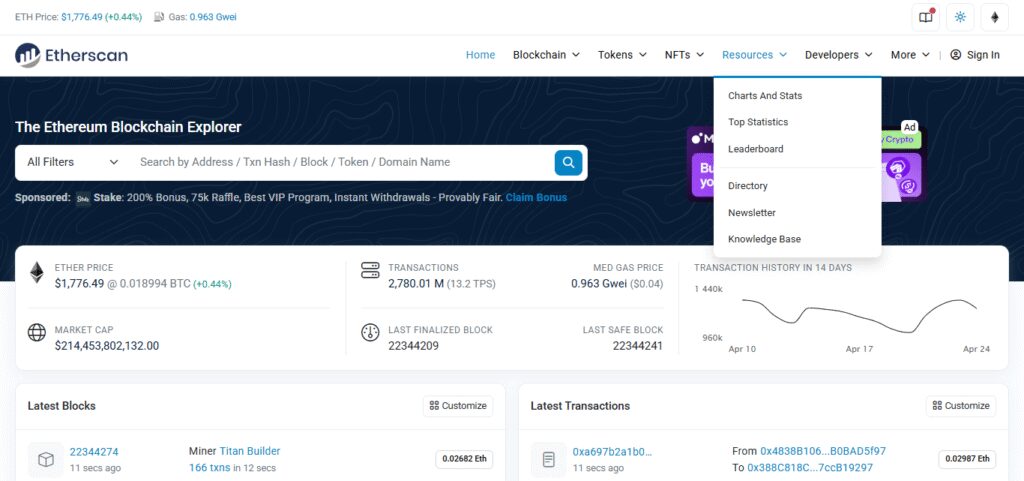
Access Etherscan
  • Navigate to Etherscan.io.

Locate The Arbitrum Bridge Contract

  • Search for Arbitrum Bridge contract address which you should have obtained earlier from the official Arbitrumm page or the bridge interface you used.
  • Example contract address: 0x42A4b67D9276c295D99C9823976b8dD06A70dE49.

Observe Transaction Logs

  • On the Contract page, navigate downwards to locate the Contract tab and select Read Contract or Write Contract to interact with the bridge.
  • To view bridging logs pertaining to the contract’s address, go to the Transactions tab and select “Internal Txns”.

Sorting The Logs

  • Sort by transaction type such as withdrawal, cross-chain transfer, etc.
  • In this case, the focus of attention will be from/to addresses, the amount of tokens involved in the transaction, and the status.

Best Practices for Tracking Bridging Logs
Best Practices for Tracking Bridging Logs

Identifying Success or Failure of a Bridge Transaction

To check the success or failure of a bridge transaction, one must view its status on Etherscan. If the status is “Success,” then the transaction has completed, but if it is “Fail,” it has not. Check the transaction description for particular error codes or messages.

Confirmation Times Understanding for Cross-Chain Transactions

As mentioned, a cross-chain transaction needs at least one (1) confirmation from both the source and destination blockchains.

The confirmation time depends on the congestion of the network and the bridge protocol in use. You may watch Etherscan for updates about the transaction, as successful transfers take anywhere from a couple of minutes to hours.

- Advertisement -

What Can Be Done When A Bridging Transaction Is Stuck Or Was Delayed

When the transaction is delayed, check whether or not the network is functioning properly, along with the status of the bridge platform on the status page.

Send an email to customer care or leave a message on their support page. For transactions that are not progressing, some bridges provide the option to reroute it manually or have it retried automatically.

Why are bridging transactions delayed?

Bridging transactions can be delayed because of some factors like network issues, bridge platform problems, and even call confirmation delays from the source or destination blockchain.

- Advertisement -

The transacted network congestion can significantly delay the time required to confirm the transaction as it can increase the processing time. Also, other cross-chain transfers may be delayed because of infrastructural problems on the bridge platform or maintenance works.

Confirmation delays from one of the chains may also contribute to the slowness of the transaction, for example, when one of the chains is operating under heavy traffic.

To troubleshoot, check updates on transaction status and make sure that progress is being made by Ethrexsan’s transaction monitoring features. And also check if there are problems with the bridging service on the status page of the bridge.

Conclusion

To sum up my information as of Tracking bridging logs on Etherscan proactively supports the security and the successful completion of cross-chain transactions.

Etherscan provides logs that can be accessed by users for asset transfer telemetry, thereby enabling them to monitor and audit asset transfers efficiently. With periodic manual inspections, along with the other explorers, it assures integrity and reliability of the bridge operation.

- Advertisement -

You Might Also Like

Risk Management Secrets for Consistent Forex Profits

10 Biggest Crypto Gambling Jackpots That Shocked All

10 Most Searched Crypto for 2026

10 Best Crypto Casino Sites for Beginners in 2026

10 Best Qzino Casino Alternatives for Safe Online Gaming

Disclaimer

The content posted on Coinroop.com is for informational purposes only and should not be taken as financial or investment advice. We cannot always ensure that everything is complete, accurate, or reliable.
By signing up, you agree to our Terms of Use and acknowledge the data practices in our Privacy Policy. You may unsubscribe at any time.
Share This Article
Facebook Whatsapp Whatsapp LinkedIn Reddit Telegram Threads Bluesky Copy Link Print
ByNick Jonesh
Follow:
Nick Jonesh Is a writer with 12+ years of experience in the cryptocurrency and financial sectors. He writes for the coinroop on the same topic of cryptocurrency, including technical stuff for IT folks and practical guides about everything else for the real world. Nick's clear writing is a direct response to the new, crypto financial landscape.
Previous Article What Was Marilyn Monroe's Real Name What Was Marilyn Monroe’s Real Name
Next Article What Year Did George Washington Become The First President Of The United States What Year Did George Washington Become The First President Of The United States
- Advertisement -
- Advertisement -
- Advertisement -
bydfi 300x250
- Advertisement -

Stay Connected

FacebookLike
XFollow
PinterestPin
TelegramFollow

Latest News

ss
10 Smart Crypto Assistants That Manage Your Portfolio Automatically
Crypto Business
10 AI Crypto Trading Bots That Adapt to Market Conditions (2026)
Crypto Bot
Bitcoin Holds Ground as US‑Iran Peace Talks Stall, Strikes Erupt
Crypto News
CLARITY Act 2026: Timeline & Crypto Price Impact Prediction
Crypto News

You Might also Like

10 Best Tether (USDT) Prepaid Cards in 2026
Uncategorized

10 Best Tether (USDT) Prepaid Cards in 2026

21 Min Read
10 Best Skill-Based Games That Pay Real Cash Online
Uncategorized

10 Best Skill-Based Games That Pay Real Cash Online

20 Min Read
10 Best Games With Dedicated Servers for Competitive Play
Uncategorized

10 Best Games With Dedicated Servers for Competitive Play

20 Min Read
10 Best Games With Real Money Tournaments in the US
Uncategorized

10 Best Games With Real Money Tournaments in the US

20 Min Read

Our Address

In Heart Of World
Dubai & Europe
hello@coinroop.com
For Advertisement Email us or telegram at our telegram id - @coinroopads

LATEST PRESS RELEASE

plump
Plump.com Is Here & It’s Turning the Casino Industry on Its Head
Press Release

Categories

CoinRoopCoinRoop
Follow US
© 2025 Coinroop News Network. All Rights Reserved.
  • Advertise
  • Contact Us
  • About CoinRoop
  • Disclaimer
  • Editorial Guidelines
  • Privacy Policy
  • Sitemap