Small businesses are threatened by cyberattacks, including ransomware, phishing, malware, and data breaches. These can interrupt business operations and cause financial loss. To prevent these threats, a multi-layered security strategy is required.
The Top 10 Small Business Protection Layers via Quick Heal Endpoint Security include vital protection layers. Antivirals, ransomware defense, web filtering, email protection, firewalls, data loss prevention, and centralized management are protection layers that preserve business operations, endpoints, and sensitive information.
Key Point
| Protection Layer | Key Point (How it Protects Small Businesses) |
|---|---|
| Antivirus Protection | Detects and removes viruses, worms, and Trojans in real time to prevent system infection. |
| Anti-Ransomware Shield | Blocks encryption-based attacks and protects critical business data from being held hostage. |
| Web Security Filtering | Prevents access to malicious or phishing websites that can steal credentials or install malware. |
| Email Security Protection | Scans incoming/outgoing emails to block phishing links, spam, and infected attachments. |
| Firewall Protection | Monitors network traffic and blocks unauthorized access attempts to business systems. |
| Device Control | Restricts unauthorized USB and external device usage to prevent data leaks and malware entry. |
| Endpoint Behavior Monitoring | Detects suspicious application behavior and stops zero-day or unknown threats. |
| Data Theft Protection (DLP) | Prevents sensitive business information from being copied or transferred without permission. |
| Patch Management Support | Helps identify missing software updates and reduces vulnerabilities exploited by attackers. |
| Centralized Security Management | Allows administrators to monitor and control all endpoints from a single dashboard for better visibility. |
Top 10 Layers of Protection for Small Business Using Quick Heal Endpoint Security (In-Depth Analysis)
1. Antivirus Protection
When it comes to Quick Heal Endpoint Security, the first protection layer is Antivirus Protection, which continuously checks files, programs, and activities on a system for viruses, worms, and trojans, and then eliminates them. It acts in real-time to prevent malicious files from running on the system, and shields the business’s devices from common cyber threats.
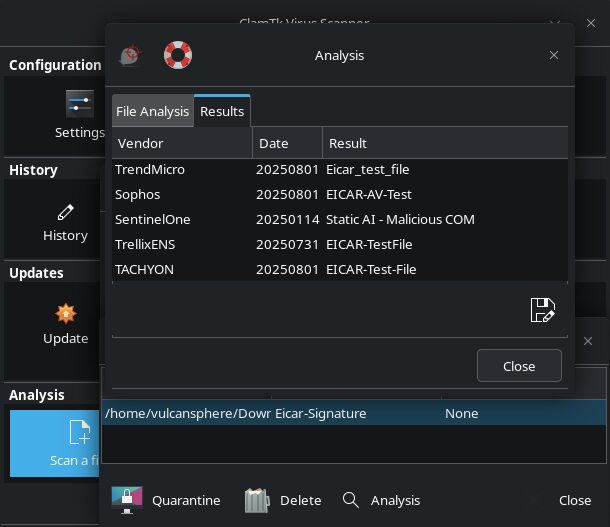
This layer of protection employs signature-based detection and heuristic analysis, which help in spotting known malware and malware that has been slightly modified. Antivirus Protection allows small businesses to safeguard against file-based attacks, minimize the risk of systems becoming compromised, and enable small businesses to operate smoothly without the disruption of malware for the system.

Key Benefits
- Detects and removes viruses, worms, and trojans during infection
- Searches and scans for remaining system threats
- Stops malicious files before they can run
- Uses signature and advanced heuristic detections on malware
- Protects the system from interruptions
Why it matters
- New businesses generally work with shared systems that are easily infected
- Increases costly downtime from malware
- Safeguards the integrity of business files
- Lessens the need to troubleshoot systems
2. Anti-Ransomware Shield
When it comes to Quick Heal Endpoint Security, the second protection layer is Anti-Ransomware Shield, which prevents the unauthorized encryption of files used to carry out attacks, and subsequently protects the files.

Therefore, it is easy to understand why this layer of protection is of utmost importance to a small business. This shield helps to prevent a file from being held hostage and allows the business to continue its operations without disruption from this type of attack.
Key Benefits
- Prevents unauthorized attempts to alter and destroy files
- Discerns abnormal file activities during alterations
- Safeguards important documents and databases
- Stops ransomware from distributing to other systems
- Prevents ransomware attacks before they can cause damage
Why it matters
- Small businesses are highly targeted by ransomware
- Prevents further monetary loss from ransomware
- Safeguards the integrity of customer and financial data
- Aids the business to continue in operations during ongoing attacks
3. Web Security Filtering
Web Security Filtering is used to block fake websites and phishing sites that could trick employees of the business into exposing sensitive information. It is used to ensure safety and scans URLs in real time..

** Web Security Filtering ** helps to restrict the access of employees to the internet in order to reduce the risk of phishing attacks, credential theft and malicious downloads.
This ensures all employees are protected from online threats and ensures safe browsing practices are adhered to on all endpoints.
Key Benefits
- Prevents employees from accessing dangerous websites
- Prevents phishing websites and false logins
- Blocks unsafe downloads from the web
- Improves employee browsing
- Lowers the chances of being exploited online
Why it matters
- Employees visit unsafe websites without their knowledge
- Prevents loss of credentials from phishing
- Reduces malware from downloads
- Safe and enabled internet access to do their work
4. Email Security Protection
Email Security Protection provides an automated defense against spam, phishing emails and malicious attachments by screening emails before and after they are sent. Potentially harmful emails are either quarantined or left to be dispensed with later.

This is a vital layer of protection as email is one of the most popular means of attack for cybercriminals. Email Security Protection prevents the majority of data breaches, financial fraud, and infections of malware that are most commonly instigated by cybercriminals through email.
Key Benefits
- Scans sending and receiving emails
- Blocks spam, phishing, and harmful attachments
- Detects forged sender identities
- Quarantines suspicious email content
- Blocks email delivery of malware
Why It Matters
- Most cyberattacks begin through email
- Stops business email compromise (BEC) attacks
- Secures sensitive communication data
- Reduces phishing financial fraud
5. Firewall Protection
Firewall protection provides a defense against external threats by maintaining a barrier between the internal and external networks while monitoring and controlling the flow of data. It denies all requests for access and blocks potentially harmful communication over the network.

With Firewall Protection, smaller businesses are empowered with improved network security and protection against hacking, data breaches and intrusions. Furthermore, it safeguards the network and internal business operations by only allowing fully vetted and trusted communications.
Key Benefits
- Monitors sent and received network traffic
- Blocks attempts to gain authorized system access
- Stops hacking and intrusion attempts
- Filters network connections
- Boosts internal network security
Why It Matters
- Small businesses don’t have an advanced security team
- Stops external attackers from gaining system access
- Safeguards shared office networks
- Protects sensitive business activities on the network
6. Device Control
Device Control provides the ability to manage and limit the use of external devices that can cause data loss such as USB and storage devices. It denies access to external devices and prevents the movement of data to and from removable storage devices.
This additional layer of protection fortifies endpoint security and provides seamless means of preventing data breaches and ensuring internal data is protected and that business operations are conducted in a legal manner.
Key Benefits
- Controls access of USB and external devices
- Stops unauthorized data transfer
- Blocks infected USB devices
- Controls devices from one location
- Reduces the risk of physical malware
Why It Matters
- USB drives are commonly used to carry malware
- Prevents loss of internal data
- Controls the devices used by employees
- Protects confidential business data
7. Endpoint Behavior Monitoring
Endpoint Behavior Monitoring detects suspicious or anomalous activity by continuously monitoring the systems and applications and behavior and activities.

Instead of having systems detect only known threats, it looks for suspicious activity that indicates a possible cyberattack.
This means that Endpoint Behavior Monitoring can successfully block zero-day threats and unknown malware before they can cause damage. Security is further optimized when the focus is shifted to behavior-based detection instead of protection that only relies on singular signatures.
Key Benefits
- Detects abnormal application behavior
- Identifies zero-day attacks
- Stops harmful actions on the system instantly
- Utilizes behavior analysis based on AI
- Doesn’t allow suspicious malware to run.
Why it matters
- Standard antivirus software can’t identify threats.
- The cyber threats against small businesses continue to grow.
- Risk is reduced for malware that grows worse over time.
- Helps to put up a defense against cyber threats before they can cause problems.
8. Data Theft Protection (DLP)
Data Loss Prevention (DLP) protects sensitive business data, including financial records, data of customers, and internal files. It determines how data can be accessed, replicated, and distributed across different systems.

Data Theft Protection (DLP) enables small businesses to avoid deliberate and accidental data breaches. It keeps sensitive data within approved data channels and protects businesses from external threats and internal data breaches.
Key Benefits
- No outside party can remove data.
- Monitors access to sensitive files.
- Prevents the copying of sensitive data.
- Monitors data in the cloud and on USB drives.
- Helps to adhere to regulatory requirements.
Why it matters
- Prevents personal customer data from being leaked.
- Prevents loss of financial and company data.
- Reduces risks posed by malicious insiders.
- Protects the company’s name and its trustworthiness.
9. Patch Management Support
Patch Management Support identifies the absence of updates to software and missing security updates on all endpoints. It ensures that updates to the systems that address vulnerabilities are applied.

Patch Management Support on the whole reduces small businesses’ exposure to the threats of cyberattacks that target systems with software vulnerabilities. It improves the overall security framework of the business by ensuring operational systems and all software are current and contain no security vulnerabilities.
Key Benefits
- Helps to find updates that have not been applied.
- Installs necessary updates automatically.
- Reduces general system threats.
- Ensures that all software is up to date.
- Prevents the exploiting of system flaws.
Why it matters
- Outdated applications can easily be attacked.
- Small businesses usually do updates late.
- Prevents hackers from exploiting vulnerabilities.
- Helps to maintain reliable systems.
10. Centralized Security Management
Centralized Security Management enables the monitoring, controlling, and management of all the security management concerns of the entire organization from a single dashboard. This enhances visibility and makes managing security simpler.

Centralized Security Management helps small businesses to promptly respond to new threats, proactively implement security policies, and monitor the health of all devices in real-time. It also helps standardize security measures across the organization.
Key Benefits
- One dashboard for all endpoints.
- Helps to monitor all the security controls.
- Provides the means to see a threat at the moment it occurs.
- Provides a centralized system to create and manage rules.
- Provides a means to improve response times for security issues.
Why it matters
- Small businesses often have no security team.
- Helps to save time in monitoring systems individually.
- Helps to ensure the same security across systems.
- Helps to improve the security controls for a company.
Key Benefits of Quick Heal Endpoint Security for Small Businesses
Real-Time Threat Protection
Stops viruses, ransomware, spyware, and other cyber threats in their tracks before impacting the organization’s systems.
Centralized Security Management
Provides the ability to view and control all endpoint devices from an integrated management console.
Advanced Ransomware Defense
Blocks unauthorized encryption of sensitive files and advanced ransomware threats.
Secure Web and Email Protection
Reduces the risk of cyber threats by blocking phishing websites, malicious links, spam emails, and infected email attachments.
Improved Data Protection
Prevents unauthorized data transfers and protects sensitive and confidential business data from theft and loss.
Reduced System Vulnerabilities
Facilitates patch and updates management by closing security gaps most exploited by attackers.
Enhanced Business Continuity
Supports cyber threats while reducing operational disruption and improving the ability of day-to-day business operations.
Why Small Businesses Need Multi-Layered Endpoint Security
Cyberattacks are growing fast
Small businesses usually have less sophisticated cybersecurity. Therefore, small businesses are usually the target of ransomware, phishing, and malware attacks.
Single-Layered Security Does Not Work Anymore
The modern cyber landscape requires you to use defense in depth, as modern cyber threats use multiple attack vectors.
Protection of Business Information
An endpoint protection platform is designed to protect consumer information and financial as well as sensitive business information from being leaked or compromised.
More Devices and Remote Work Increase Vulnerability
When an employee uses their own laptop or mobile device on a remote network, this creates additional pathways for cybercriminals to attack the information system.
Reduces Loss and Downtime
The loss caused by the disruption of business operations is minimized by defense in depth as well as the cost incurred due to recovery from the impacts of the cyber attack.
Assists in Recognizing Zero-Day Threats and Unknown Threats
Advanced threat detection uses artificial intelligence to engage in behavioral analytics to recognize threats before they are given the ability to proliferate throughout the information system.
Enhances Business Continuity
Robust endpoint protection defense for business communication and protection allows the business operations and productivity of the employees to remain uninterrupted.
Conclusion
Small to medium-sized companies have fallen victim to growing attacks such as ransomware, phishing, and data theft. A single defense mechanism is no longer adequate to address the numerous cyber threats.
Quick Heal Endpoint Security offers the best layered protection, which combines various security technologies, including, but not limited to, antivirus, anti-ransomware, web and email security, firewall, endpoint protection, device control, behavioral data loss prevention, and patch management.
Taking a proactive and layered security approach, small businesses can reduce cyber risks, protect sensitive data from theft, and enable employees to continue to work without disruption. Quick Heal Endpoint Security improves small businesses’ ability to defend against endpoint threats and make security management easier. It provides improved defense and cyber resilience.
FAQ
What is Quick Heal Endpoint Security?
Quick Heal Endpoint Security is a business cybersecurity solution designed to protect endpoints such as desktops, laptops, servers, and network devices from malware, ransomware, phishing, and other cyber threats.
Why do small businesses need endpoint security?
Small businesses often have limited cybersecurity resources, making them easier targets for cybercriminals. Endpoint security helps protect sensitive business data, prevent downtime, and reduce financial losses caused by cyberattacks.
How does Antivirus Protection work in Quick Heal Endpoint Security?
Antivirus Protection continuously scans files, applications, and system activities to detect and remove viruses, worms, Trojans, and other malicious software before they can damage business systems.
What is the role of Anti-Ransomware Shield?
Anti-Ransomware Shield monitors suspicious encryption behavior and blocks ransomware attacks before files become locked or inaccessible, helping businesses protect critical data.
How does Web Security Filtering improve cybersecurity?
Web Security Filtering blocks malicious websites, phishing pages, and unsafe downloads, reducing the risk of malware infections and credential theft during internet browsing.